How We Made Sharing Easy at Macro
Access management is one of the hardest systems we’ve built at Macro - and the one we’ve rewritten the most, finally landing on something that is the most complex technically and the easiest to understand for the user.
This is one part of a multi-part piece on how we design the Macro file system (MFS). Our focus in this article is on the access management (sharing and collaboration) system.
Some background on the Macro Filesystem#
Macro Filesystem (“MFS”) is a unique problem because - unlike a single-purpose software (for example, Linear for tasks, Slack for chat, and so on) — Macro needs a flexible schema that can work for these different content types. Every entity in Macro lives in one workspace under one access model.
MFS is also different from (and more complex than) a POSIX filesystem that just needs to store files on one system:
- MFS is real-time collaborative for certain entity types, like markdown docs, and version-controlled. It needs to support different types of collaboration for different entity types, like how channels are turn-based and documents are real-time. A POSIX file system can assume a single machine, one owner editing a file at a time, and R/W/E permissions.
- MFS needs to be globally available in under 100ms for every user, no matter where they are.
- MFS is multi-modal, not just files: channels, video calls, emails and more over time.
Of course, beyond these requirements, the system should be simple for users and developers to use. This is our design goal generally with Macro, and why it is built in Rust/SolidJS and why we put so much effort into product design.
Designing permissions and sharing for MFS#
When we talk about permissions, we are referring to which users and agents should have access to what. Sharing is closely related: is it the act of granting permissions and, typically, notifying users or agents of granted permissions via email, push notification or Macro message.
In designing sharing and permissions for MFS, we had the following goals:
- MFS sharing model should extend nicely to agents, not just humans.
- For users, sharing should work in as much the same way as possible for every entity type. For example, sharing a transcript of a call should not work differently than searching a document.
- Sharing should be simple. We are not concerned with obtuse enterprise use cases. At least not yet. We are concerned with avoiding gotchas, protecting privacy, and making it very easy to use.
- Bad abstractions that create headaches for each block team (for example, the email team or the docs team) should be discarded. Where flexibility is needed, it should be allowed.
The First Sharing System#
MFS has had 2 main “share” models. The initial model was fairly standard and mirrored how something like Google Drive and other cloud drives allow you to share items.
- Items can be made publicly accessible
- Items can be shared with individual users or your entire organization.
- If a project (folder) is shared with you, then all items within that project are also shared with you.
To support simple sharing we set up a UserItemAccess table that would record all the entities that were shared and who they were shared with. We made it purely user based: one row per user per item they could reach. Sharing a project with your organization meant writing a row for every member, so adding or removing someone from the org meant fanning that change out across every shared item. That was not ideal, but shared item counts were small and membership rarely changed, so it held up fine early on. We have since dropped organizations entirely in favor of a new team system.
When it came to finding all items a user has access to you’d have to look up your user id in UserItemAccess and, for every project, recursively drill down into it to grab all sub-items. By all accounts this seemed fine at first and gave us everything we needed for the initial setup.
The Eureka Moment#
As time went on and channels (group messaging) were released, we frequently found ourselves sending docs to one another through a channel only to be hit with “I don’t have access to this”.
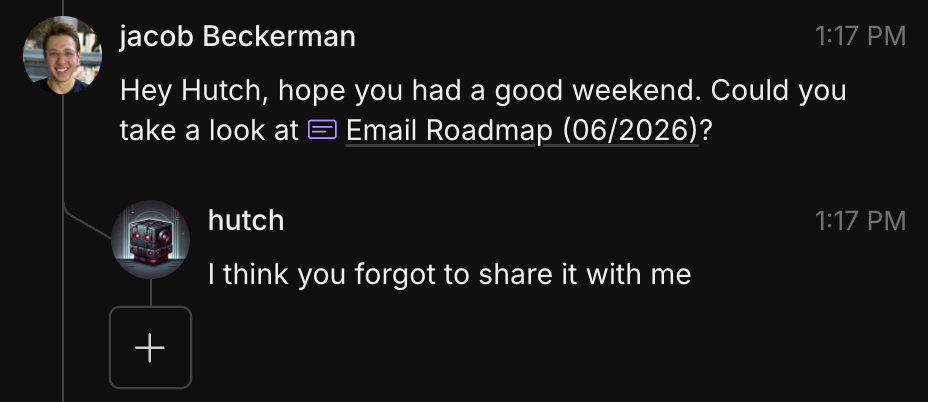
Of course this is nothing unique to Macro. This happens 50% of the time when you paste Google Docs link in Slack, or a Figma in a Notion. So we didn’t initially recognize this was a problem we could solve.
One day, though, we were sitting in the office and thought…
“WAIT, we can fix this sharing foot-gun problem!”
Introducing: Channel Based Sharing#
Because Macro has everything in one system, we thought, why not just “cascade” - that was the first word we used to describe it - the permissions from the channel to the document.
Everybody in the channel should obviously have access to the document.
Would you ever send anything to “Teo” and not want him to access it? Never.
Or if you send something to #engineers, surely you want all the engineers to be able to access it? Of course.
At first, our idea was that we would just set up a webhook to “auto-share” things using the existing share system that we had built with members of a channel.
To make it work, sharing an item in a channel would grab every user in that channel and insert UserItemAccess rows for them. That bought us the behavior we wanted but piled on the same problem as before: now channel membership changes also had to fan out across items.
This all worked okay… but…
The Problem: It Was Slow#
We had literally just finished shipping our sharing system, it worked, and we didn’t have any desire to rewrite how sharing worked. Copying Google Drive seemed fine. The webhook idea seemed fine. But it was slow.
As the number of items a user had grew with each new entity type, the recursive read query got slow, especially on a cache miss. For some power users it could take over 10 seconds to grab “user accessible items” depending on database load and other factors. The cause was the shape of their data: large nested projects alongside many root level items, which the query planner couldn’t walk efficiently.
On top of the read cost, the write side was a liability of its own. Every channel or org membership change meant remembering to grant or revoke the right items, which was easy to get wrong. This was unacceptable to us, and I began designing a new system to fix both halves.
Why not rework the WHOLE sharing system to work around channels?
Instead of a webhook side effect, what if the actual sharing system itself was channel-based, instead of working like Google Drive?
We explored the edge cases, there was nothing fatal, so we decided to rework the idea of sharing around channels.
Making Channel Based Sharing Fast#
The new design flattens everything into a single table and requires no recursion at read time, at the cost of becoming more write heavy. The recursion doesn’t disappear, it moves to write time, which happens far less often and tolerates latency much better. That trade works for us because the vast majority of items aren’t deeply nested, and it leaves the door open to push writes onto an event-based pipeline later without touching the read path.
CREATE TABLE entity_access
(
	entity_id UUID NOT NULL, -- document_id, project_id, chat_id, email_thread_id
	entity_type EntityType NOT NULL, -- document, project, chat, email
	source_id TEXT NOT NULL, -- channel_id, team_id or macro_user_id if creator
	source_type TEXT NOT NULL, -- channel, team, user if creator
	access_level AccessLevel NOT NULL, -- the access level granted to the source for a given entity
	granted_from_project_id UUID -- if a project was shared, items in the project will be tracked with this column
);
How does the entity_access system fix the previous iterations’ shortcomings?
Instead of creating records per user we create them per source for channels and teams, this means removing a user from a channel or a team is as simple as deleting them as a member from the respective entity. NO MORE SIDE EFFECTS.
The source of the entity_access can either be a channel, team or user (for item creators).
The granted_from_project_id is what allows us to know which project was actually shared to create the entity_access record. This means if that project is deleted or moved it becomes a lot easier to update all required entity_access records.
Adding an item to a project#
In this example we will have the following project structure:
A/ -- owner 1
-- B/ -- owner 2
---- C/
----- Add item here
Let’s say we are adding an item to project c.
Programmatically, we need to walk up the tree to get all parent project ids including project_c. This will give us an array of [project_a, project_b, project_c]. Next, get all channel/team source entries and access_levels for those projects.
| source_id | source_type | access_level | granted_from_project_id |
|---|---|---|---|
channel_1 |
channel | view | project_a |
team_1 |
team | comment | project_b |
team_2 |
team | edit | project_c |
In this example:
project_awas shared withchannel_1which means thatchannel_1should have view accessteam_1was sharedproject_bwhich means it should get comment accessteam_2was sharedproject_cwith edit access
With that information we need to insert the following records:
| entity_id | entity_type | source_id | source_type | access_level | granted_from_project_id |
|---|---|---|---|---|---|
<entity_id> |
<entity_type> |
channel_1 |
channel | view | project_a |
<entity_id> |
<entity_type> |
team_1 |
team | comment | project_b |
<entity_id> |
<entity_type> |
team_2 |
team | edit | project_c |
<entity_id> |
<entity_type> |
<user_id> |
user | owner | |
<entity_id> |
<entity_type> |
owner1 |
user | owner | project_a |
<entity_id> |
<entity_type> |
owner2 |
user | owner | project_b |
Alongside the channel/team sources, we also fetch each parent project’s owner (owner1, owner2) and insert an owner row for them so they retain access to items added anywhere beneath their projects. The <user_id> row with no granted_from_project_id is the creator of the new item itself.
Granted, there is more work upfront to ensure we are inserting correct access for a new item in a project, but our workload is very read-heavy and we should be prioritizing that over insertion speed.
Moving a sub-project#
In this example we will have the following projects:
A/
--B/
----C/
------ document_a
------ document_b

X/
--Y/
----Z/
In the example we are going to move project C from project B into project Z.
We will need to walk up the project tree to get all parent project ids (project_a, project_b). Notably this excludes project_c as we don’t need to change any of its existing permissions. project_c can still be shared with the team/channel like it used to be with no changes required.
Now we need to get all items in project_c (document_a, document_b).
Next, we DELETE FROM entity_access WHERE entity_id = ANY([document_a, document_b, project_c]) AND granted_from_project_id = ANY([project_a, project_b]). This will remove any implicit permissions that parent projects got when project_c was inside of it.
Now, we perform the steps in Adding an item to a project with all the items in project c (including project c itself).
Deleting a project#
When a project is deleted, all of its items are deleted as well. This process will be the exact same as the current process with UserItemAccess with a slightly different query to delete from entity_access where granted_from_project_id = x OR entity_id = x.
How do we access items#
Now, instead of performing the recursive tree walk for projects to get all accessible items, we can simply get the users channels and teams (easily cacheable queries) and then perform 1 query on entity_access with source_id being ANY([channels, teams, user_id]).
Because a user can reach the same entity through multiple sources (for example, a channel that grants view and a team that grants edit), this query can return more than one row for a single entity. When that happens, the highest access level wins - so in that example the user ends up with edit.
Conclusion#
Sharing is now as easy as sending someone a message, and we can retrieve everything a user has access to quickly. Flattening entity access into a single table reshaped the system around the access pattern that actually mattered to us:
- Reads got fast.
- The recursive tree walk became a single indexed lookup, taking our worst-case power user from 10+ seconds on a cache miss down to ~600ms.
- Membership changes lost their side effects.
- Because grants are stored per source rather than per user, adding or removing someone from a channel or team is just adding or removing a member.
There are still downsides to the new system of course. The recursion wasn’t completely eliminated but was moved to write time, where granting access still has to walk the project tree. Our workload being overwhelmingly read heavy made this choice something we were much more willing to stomach. The nature of the writes also allows us to setup an event-based pipeline should we ever have high enough volume where we need to process these asynchronously.